Workspaces
A workspace is Bowire's project-folder abstraction. Every URL you discover, every collection, every recording, every benchmark, every flow, every {{var}} you reference lives inside one. The workbench always has exactly one active workspace; switching workspaces switches every list, every URL binding, and the variable resolution table all at once.
Workspaces replace the v1.x Environments concept. Where v1.x had a separate Environments rail and a separate Workspaces rail, v2.1 folds both into one: env vars are now workspace-scoped and ship in the same Kuestenlogik.Bowire.Workspaces package as the rail itself (release notes — Welle 2). The Kuestenlogik.Bowire.Rail.Environments package was retired in v2.1.
ASP.NET environments are unchanged. This page is about Bowire workspaces. ASP.NET's
Development/Staging/Productionenvironments (appsettings.Development.json,IHostEnvironment, etc.) are a separate concept and are not affected by anything described here.
The Workspace switcher
The topbar's left cluster shows the active workspace's name, color chip, and a chevron. Click the chevron to open the switcher dropdown.
The dropdown lists every workspace with:
- A color chip (the same swatch shown in the topbar)
- The workspace name
- A last-used timestamp
- Hover-revealed
…menu — Rename, Duplicate, Export to.bww, Delete
Below the list:
- + New workspace — opens the create dialog (name, color picker, optional URL seed)
- Import workspace… — accepts a
.bwwfile - Manage workspaces… — opens the Workspaces rail full-pane editor
Pick a workspace and the workbench swaps every sidebar list in-place: URLs, collections, recordings, benchmarks, flows, env vars. The change is animation-free so the operator never loses orientation.
Color picker
Each workspace carries a color from Bowire's tasteful palette (sky / emerald / amber / violet / rose / slate). The color shows up in:
- The topbar workspace chip
- The switcher dropdown
- The browser favicon while the workspace is active (the Bowire mark is tinted with the workspace color)
- Recording / collection / flow row decorations when surfacing cross-workspace lists
Pick a color when creating the workspace; change it later via Rename… → Color. Color is purely visual — no behaviour hangs off it.
URL bindings are per workspace
When you add a source URL in the Discover rail, the binding is stored against the active workspace, not against the Bowire install. Switch to another workspace and the URL list switches with it.
This is the v2.1 fix for the v1.x complaint "I added http://localhost:5001 in my Petstore project and now it shows up in my Acme project too". URLs live in bowire_ws_<id>_server_urls in localStorage (or in the workspace's on-disk directory if you're using Workspace.Git); the legacy install-wide bowire_server_urls key migrates into the first workspace on first boot of v2.1.
Machine scope vs. workspace scope
Bowire stores two kinds of state:
| Scope | Lives in | Examples |
|---|---|---|
| Workspace | bowire_ws_<id>_* keys + the workspace's .bww / directory |
URLs, collections, recordings, benchmarks, flows, env vars, secrets, presets |
| Machine | Bowire's app storage (~/.bowire/app.json) |
The list of workspaces itself, the active workspace id, theme preference, plugin install state, rail enable/disable, settings.json |
The line is deliberately drawn around "things that should travel with a .bww" vs. "things that describe this Bowire install". The Workspaces rail (workspace list itself) lives in machine scope — the operator's list of projects describes the operator's machine, not any one project.
Environment variables ({{var}})
Variable substitution is per-workspace. Anywhere a request needs a value — body JSON, metadata, the URL field — you can use {{name}} placeholders. Before the request fires, Bowire substitutes them from the workspace's env-var table.
{
  "userId": "{{userId}}",
  "token": "{{apiKey}}",
  "host": "{{baseUrl}}"
}
If a placeholder has no matching variable it is left untouched ({{userId}} stays as-is) so typos are visible instead of silently producing empty strings.
To emit a literal {{name}} without substitution, double the braces: {{{{name}}}}.
Source prefixes
{{name}} resolves through workspace variables and globals by default. Prefixes route the lookup to a specific source:
| Prefix | Example | Source |
|---|---|---|
env. |
{{env.baseUrl}} |
Active workspace + globals (same as bare) |
prev. |
{{prev.token}} |
Last response body (JSON path) |
step<N>. |
{{step1.id}} |
Response of step N in the active recording |
runtime. |
{{runtime.now}}, {{runtime.uuid}} |
Built-in system values (see below) |
secret. |
{{secret.apiKey}} |
Workspace-scoped secrets (in-memory) |
captured. |
{{captured.token}} |
Values written by a pre/post script |
ai. |
{{ai.subject}} |
Session-cached AI-suggested values |
keyring. |
{{keyring.github.com/deploy-bot}} |
OS credential store — Windows Credential Manager / macOS Keychain / libsecret (see below) |
OS keyring (keyring.*)
{{keyring.service/account}} reads a secret straight from the operating system's credential store, so a real credential never has to live in a workspace file, an env-var table, or a shared collection. The reference is split on the first / into a service (mandatory) and an account (optional): {{keyring.github.com/deploy-bot}} looks up account deploy-bot under service github.com; {{keyring.stripe-key}} looks up the bare service stripe-key.
| Platform | Backend | Store a value with |
|---|---|---|
| Windows | Credential Manager (CredRead, generic credentials) |
PowerShell CredentialManager module, node-keytar, or Python keyring (blob decoded UTF-16LE) |
| macOS | Keychain | security add-generic-password -s <service> -a <account> -w <secret> |
| Linux | libsecret | secret-tool store --label=<l> service <service> account <account> |
The read is local-first and on-demand: nothing leaves the machine, and the store is only touched for a reference a request actually contains — Bowire never enumerates it. Resolved values are masked in the UI and scrubbed to *** at every export boundary (recordings, HAR/curl export, collection share), exactly like {{secret.*}}.
The source ships in the optional Kuestenlogik.Bowire.Keyring package (bundled in the standalone CLI; embedded hosts add it explicitly). When the package isn't installed — or an operator switches the OS Keyring module off in Settings → Modules — {{keyring.*}} placeholders are left intact so a missing credential surfaces loudly instead of sending an empty value. A machine-wide kill-switch is Bowire:Keyring:Enabled=false.
For CI, the same resolution is available headless: bowire test <flow.json> --keyring reads every {{keyring.*}} ref the flow touches from the runner's credential store, so pipeline secrets stay out of the flow file and the --env-file.
AI-suggested values (ai.*)
{{ai.subject}} asks the configured AI provider for one plausible value for a variable named subject and caches it for the session (requires the AI Assistant module). The value is fetched once, just before the first send that references it, so the same request body stays stable across retries.
Re-roll. Put the caret inside an {{ai.…}} reference and a small preview popover shows the current value with a ↻ button. Click it to discard the cached value and regenerate — useful when the first suggestion doesn't fit. The fresh value replaces the cached one, so the next send uses it.
Deterministic seed for CI. The CLI has no AI provider, so bowire test <flow.json> --ai-seed <seed> resolves every {{ai.*}} ref to a stable value derived from the seed + the ref name (name-<hash>) instead of calling a model. The same (seed, ref) always produces the same value, so a flow's requests are byte-reproducible across runs and machines — pin your assertions against the seeded value.
System variables (runtime.*)
These don't need to be defined anywhere — they resolve at substitution time. Useful for JWT claims (iat/exp), correlation IDs, and any time-bound or random values in test requests.
| Placeholder | Value |
|---|---|
{{runtime.now}} |
Current Unix timestamp in seconds |
{{runtime.now+N}} / {{runtime.now-N}} |
runtime.now + / - N seconds (e.g. {{runtime.now+3600}}) |
{{runtime.nowMs}} |
Current Unix timestamp in milliseconds |
{{runtime.timestamp}} |
Current ISO 8601 timestamp |
{{runtime.uuid}} |
Random RFC 4122 v4 UUID |
{{runtime.random}} |
Random integer in [0, 2^32) |
Legacy ${name} syntax
Bowire's original Bash-style placeholders (${name}, escape $${name}) still resolve through the same dispatch table for backwards compatibility, but they are deprecated (#145). Every new surface (autocomplete, AI prompts, empty-state copy, examples in this doc) emits the canonical {{name}} form only.
To convert a workspace in one go, open Settings → Data → Migrate ${name} → {{name}}. The migration walks every recording, collection, freeform request, flow, env var and global, rewrites in place, and persists the change immediately. It is idempotent: re-running on already-migrated data does nothing.
A one-time toast surfaces on workspace load when legacy placeholders are detected; Migrate now runs the same conversion the Settings action does, Snooze dismisses it for this workspace.
Where variables are substituted
Substitution happens client-side, just before the request is sent. It applies to:
| Location | Example |
|---|---|
| Request body JSON | { "user": "{{userId}}" } |
| Metadata values | Authorization: Bearer {{token}} |
| Server URL field | https://{{baseUrl}} |
| Channel send messages (duplex / client streaming) | Same as request body |
| Compose rail URL / body / headers | Same dispatch table |
Metadata keys are not substituted — only values.
Per-frame resolution in streaming sends. For duplex / client-streaming channels (WebSocket, gRPC), substitution runs on every outbound frame, not just the initial connect. So {{runtime.now}} / {{runtime.uuid}} produce a fresh value per frame, and the async sources ({{ai.*}} / {{keyring.*}}) are prefetched per frame before substitution — a frame that references one resolves it live instead of sending a stale or empty value.
The .bww file format
A workspace is portable. The Workspaces rail's per-row Export to .bww action writes a single JSON file containing the full workspace state: URLs, collections, recordings, benchmarks, flows, env vars, globals, presets. Import via the switcher's Import workspace… entry or by passing a .bww path to the create dialog.
The full schema reference lives at docs/features/workspace.md — same canonical v2 envelope produced by both the workbench's Save-as flow and the bowire workspace export CLI.
The Workspaces rail
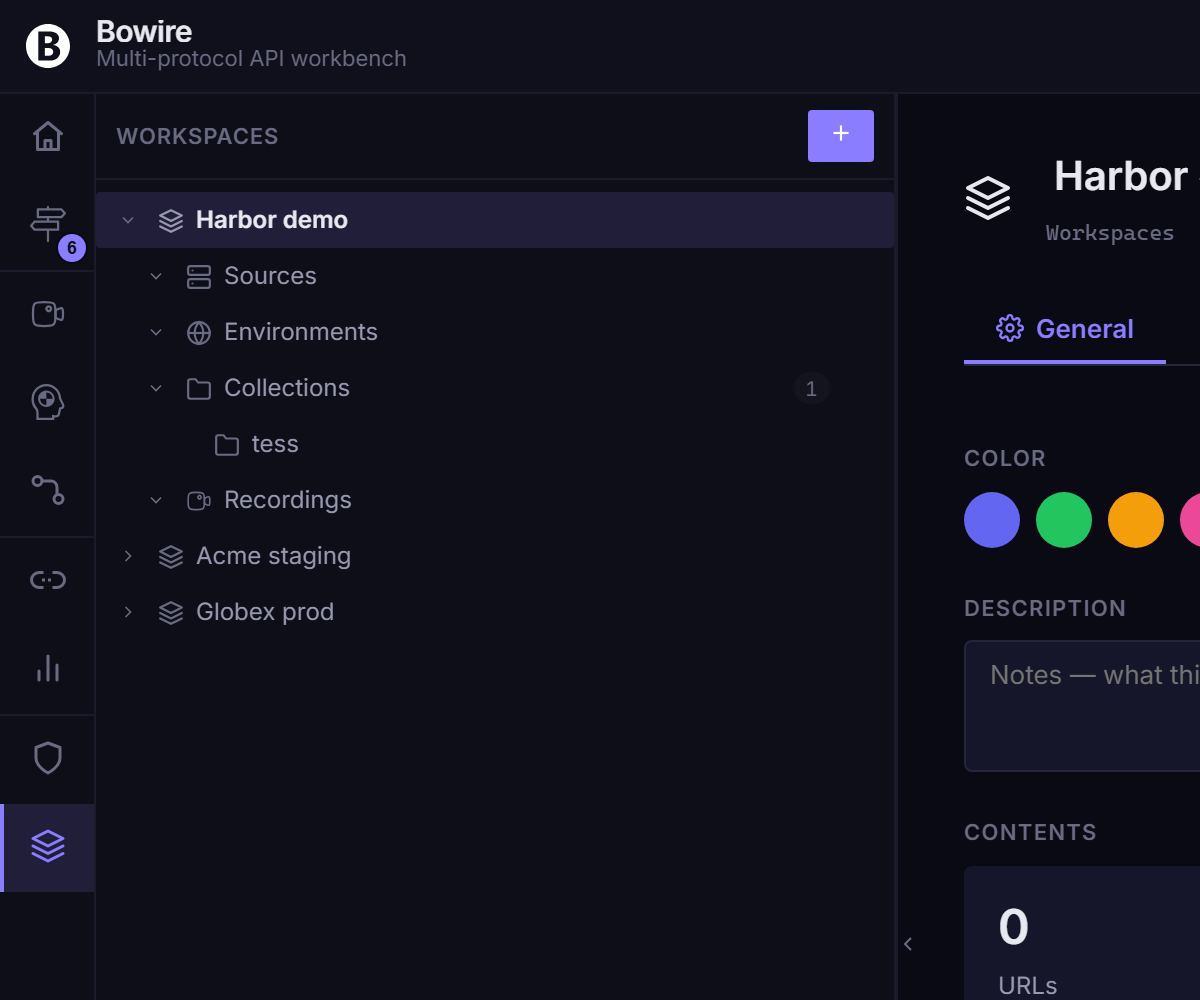
Open the Workspaces rail from the rail strip for the full-pane editor. It surfaces:
- The workspace list with manual ordering (drag-handle on each row) and a sort dropdown (last-used / created / alphabetical / manual) (#279)
- A workspace detail pane showing URLs, collections, recordings, env vars, secrets
- Per-row trash icon (soft delete; restorable from the topbar's aggregated Trash drawer)
Operator-saved sort preference + manual ordering persist in bowire_workspaces_sort and survive a rebuild of the underlying workspace list.
Persistence
Workspace state is stored in two places, kept in sync:
- Browser localStorage (
bowire_ws_<id>_*,bowire_workspaces,bowire_active_workspace_id) — instant updates, no server roundtrip. - Disk at
~/.bowire/— survives browser changes, profile switches, and CLI runs. The same folder used for plugins.
On startup, Bowire loads from disk first, so opening Bowire in a fresh browser still shows your workspaces. Every change is debounced (400 ms) and pushed back to disk.
REST API
The disk store is also exposed as a tiny REST API for tooling and CI scenarios:
| Endpoint | Method | Purpose |
|---|---|---|
/bowire/api/workspaces |
GET |
Returns the workspace list |
/bowire/api/workspaces/<id> |
GET |
Returns one workspace's full document |
/bowire/api/workspaces/<id> |
PUT |
Replaces the document (validates JSON) |
/bowire/api/workspaces/<id> |
DELETE |
Soft-deletes the workspace |
The browser uses these endpoints internally; you can call them yourself to seed workspaces from a script.
The legacy /bowire/api/environments endpoints stay mounted for one release window so existing CI scripts keep working — they now route to the active workspace's env-var table.
Tips
- Use a separate workspace per project / customer. Switching is cheap; the topbar chip + favicon tint give you visual confirmation you're in the right one.
- Pick distinctive colors for your most-active workspaces. The favicon tint is the fastest "am I in Prod?" check.
- Combine with Collections and Recordings to ship a smoke-test bundle as a single
.bwwexport.
Screenshot
See also
- Workspace file format — the
.bwwschema reference + theWorkspace.Gitper-entity directory layout - Collections — managed from the Compose rail; ride along in the workspace's
.bww - Export & import —
.bwwround-trips, HAR / cURL / Postman interchange - Settings — the
Workspacesrail toggle + the${name}→{{name}}migration action