Sidebar
In v2.0 the left side of the workbench has two layers — the thin rail on the very left for mode switching, and the sidebar next to it for the list of things in the active mode. The sidebar reshapes per rail mode; the rail itself stays put.
Rail (the left strip)
13 rail-mode icons drive what the sidebar shows. Click an icon to swap modes; the active mode lights up the icon in the accent colour. Order top to bottom:
- Home — Continue / Start / Favorites / Recent activity launchpad.
- Discover — services / methods tree (this page's main subject).
- Workspaces — the named contexts that bundle URLs, environments, collections, AI config (#116).
- Sources — discovery URLs + uploaded schema files (#92).
- Collections — named bundles of saved requests.
- Environments — variable / secret sets the resolver pulls from (#125).
- Recordings — captured request/response sessions you can replay or mock (#94, #144).
- Mocks — running mock servers (
#94Phase 2). - Benchmarks — envelope-architecture load tests (#131).
- Flows — visual request chains.
- Proxy — MITM-captured live traffic (#99 / #153).
- Security — threat model + per-endpoint scan templates (#112).
- Burger / App-Drawer — secondary actions (Settings, About, Theme, Help — opens from the top left when you click the B-Logo).
Sidebar (per-rail list)
Every mode renders into a unified toolbar row at the top of the sidebar plus a list below. The toolbar carries:
- Title —
Discover,Workspaces,Mocks, etc. Click-to-overview where it makes sense. - Spacer — pushes the trailing actions to the right.
- Action buttons — square 26 px icon buttons specific to the mode (e.g. a filter ⛛ in Discover; replay in Mocks).
- Primary
+button — accent-coloured, opens the create flow for the mode (new request / workspace / collection / recording / mock host / envelope / flow). - Overflow
⋮— dropdown for less-common actions (delete all, edit settings…).
Each list item follows the hover-reveal pattern: name + meta visible at rest, secondary tools (rename pencil, settings gear, danger trash) materialise on row hover. State markers (active checkmark, default-star) occupy a reserved-width slot so the row doesn't reflow.
Discover sidebar specifics
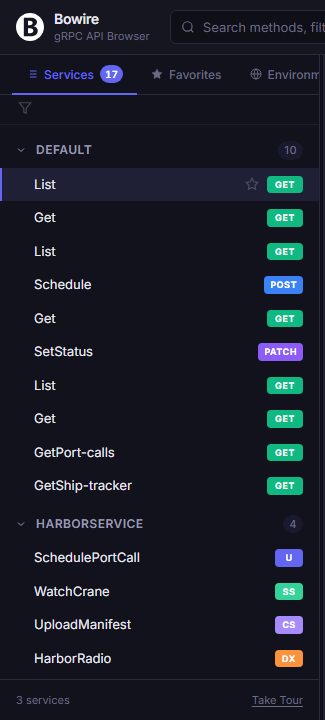
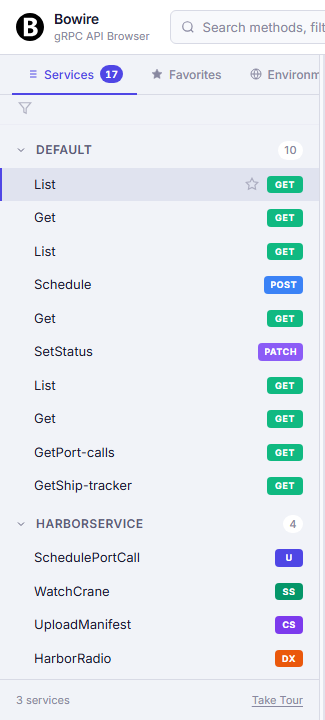
The Discover sidebar is the only one that walks a tree (services → methods) instead of a flat list, so it grows a few extra controls:
- Filter button (
⛛) in the toolbar opens a popup with three sections — Favorites only, Filter by protocol, Filter by type (Unary / Server-Streaming / Client-Streaming / Duplex), Filter by URL (when ≥ 2 discovery URLs are loaded). The favorites toggle lives inside this popup as its first option — there's no separate star button on the strip. - Name-filter input below the toolbar — types narrow the visible tree in real time.
Escclears. - Chip strip appears only when at least one filter is active — visualises the current narrowing as removable pills.
- Compare button — appears when there are two services (or two discovery URLs) to set against each other; opens the side-by-side service compare surface (#182).
- Name / route toggle (🌐) — flips every method row between its method name (
GetForecast) and the HTTP route it answers on (/api/Weather/forecast/{city}). The choice is sticky across restarts and applies to the favourites list too. The button only appears when the discovered set actually holds a route — a workspace of plain gRPC or MQTT methods has nothing to switch to. In route mode the method name moves into the row's tooltip, and the verb is not repeated in the label because the call-type badge already carries it (#47). - Service groups are expandable tree nodes per protocol. Each method row shows its call-type badge (Unary, Server-Streaming, Client-Streaming, Duplex — or the HTTP verb for a REST endpoint), its label (method name or route, see above), and a hover-reveal star for favoriting. Drag a method to drop it into a Collection picker (#431).
The protocol-tab strip from v1.x has been retired in favour of the filter-popup-with-multi-select approach — one place to slice the tree by any dimension, not three competing strips.
Search across the workbench
Cmd/Ctrl+K opens the omnibox (#124) — a single search line that ranks methods, recordings, collections, settings, and ?-prefixed AI prompts uniformly across every rail. This replaces the sidebar-local / search from v1.x.
Favorites
Favoriting is a per-method toggle on the Discover tree row (the hover-reveal star). Favorites surface in two places:
- Home rail — top section "Favorites", a 3×3 capped grid; click the section title to open a right-side drawer with the full list.
- Discover sidebar — turn on "Favorites only" inside the filter popup to narrow the tree.
Favorites persist per-workspace in localStorage (browser mode) or in the workspace's .bww (git-backed mode).
Drawer-Modus auf schmalen Viewports
Bei < 1400 px wird die rechte Drawer-Familie (Assistant, Help, Tests, Activity) automatisch zu einem position: fixed-Overlay. Die linke Sidebar bleibt im Flex-Flow.
See also: Action bar, Request pane, Response pane, Favorites & History, Keyboard Shortcuts